Location tracking answers where. Screen mirroring answers what is on the screen. Message monitoring answers who the child is communicating with and what is being said. Each of these capabilities adds a layer to a parent’s understanding of their child’s digital world.
But none of them answers the question that sits behind all the others, the one that matters most in the moments of sharpest parental concern: what is happening around my child right now?
A location pin on a map confirms the device is at the right address. It does not tell a parent whether the environment at that address is safe, whether the people present are who the child said they would be, or whether something is happening that the child either cannot or will not describe over a text message. Physical environment — the space a child is actually in, the sounds around them, the people nearby — is the dimension of their experience that standard monitoring tools do not reach.
MyParental’s Live Monitor addresses this gap through two real-time capabilities: a remote camera that allows parents to see the child’s physical surroundings through the phone’s front or rear camera from anywhere in the world, and ambient audio monitoring that allows the parent to hear what is happening around the child’s device — and to record that audio for later review. Together, these tools extend parental awareness into the child’s immediate physical environment in ways that no other monitoring feature can replicate.
This guide covers everything parents need to understand about these capabilities — what they do, how they work, when they are most useful, how to set them up, the legal and ethical framework that governs their use, and how to use them responsibly in a way that genuinely serves the child’s safety.
1. The Gap That Other Monitoring Features Leave
Most parental monitoring tools — including the location tracking, message monitoring, app usage reporting, and screen time management that make up the bulk of any monitoring platform — operate on recorded data. They capture what a child has done, who they have communicated with, where their device has been. They answer questions about the past, even the very recent past.
This retrospective quality is genuinely useful for understanding patterns, for reviewing activity after something concerning has come to a parent’s attention, and for creating the kind of accountability structure that influences a child’s behavior over time. But it has a fundamental limitation: it cannot answer questions about what is happening right now, in the physical space the child is occupying.
The Specific Scenarios Where Real-Time Environmental Awareness Matters
Consider a parent who receives a geofence alert that their child’s phone has left school unexpectedly early. The location update tells them where the device went. It does not tell them what is happening at that location — whether the child is safe, whether they are with the people they were supposed to be with, whether the environment is appropriate.
Consider a parent whose child is supposed to be studying at home. The screen time data confirms the phone is in use, the location shows it is at home, the message log shows some communication with friends. None of this tells the parent whether the child is actually in a safe, appropriate environment at home, or whether something concerning is happening that the monitoring data does not capture.
Consider a parent who is traveling and who has been unable to reach their child by phone for longer than expected. The location data shows the device is where it should be. But the parent’s instinct — the specific anxiety of being physically separated from a child and unable to make contact — is not resolved by a location coordinate.
In each of these scenarios, what the parent needs is not more logged data. They need a window into the immediate reality of their child’s environment. That is what Live Monitor provides.
2. What MyParental’s Live Monitor Provides
MyParental’s Live Monitor is a component of the MyParental parental control platform that gives parents real-time sensory access to the child’s immediate environment through two distinct but complementary capabilities.
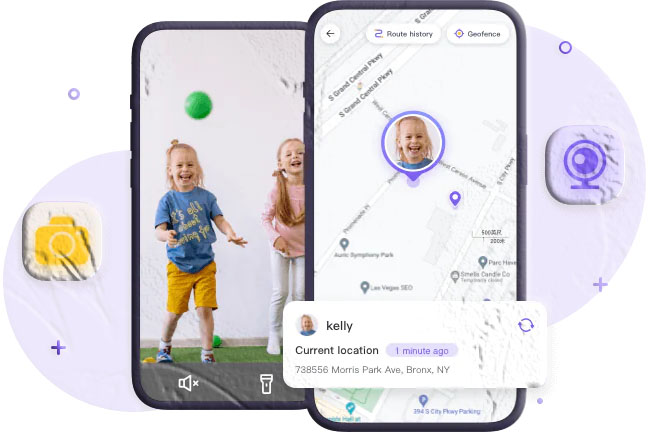
Remote camera — the parent activates the camera on the child’s phone (front or rear) from the MyParental parent dashboard and receives a live video feed showing the child’s physical surroundings. No physical access to the device is needed after the initial setup. The parent can switch between cameras and, where lighting is limited, activate the device’s flashlight for improved visibility.
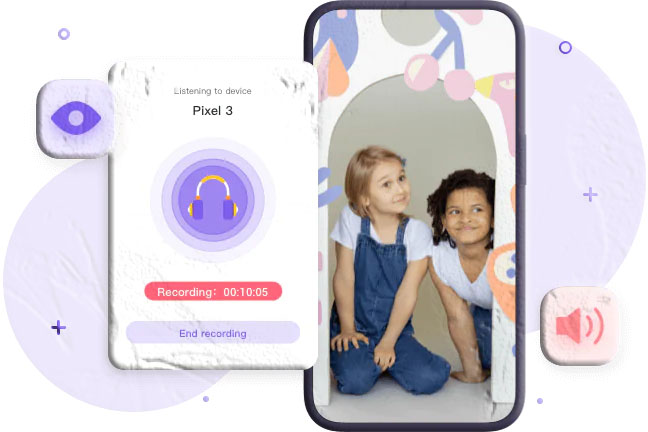
Ambient audio monitoring — the parent activates the microphone on the child’s phone from the dashboard, enabling one-way audio transmission from the device’s environment to the parent’s interface. The parent hears the ambient sounds around the child’s device — conversations, background noise, environmental indicators — without the child or anyone near them hearing the parent. Recordings can be saved for later review, and scheduled recording windows can be configured to capture ambient audio automatically during specific time periods.
Both features are accessible through the MyParental parent dashboard — from the parent’s smartphone (available on the Android) or through any modern web browser — from any location with an internet connection, without requiring the parent and child to be on the same Wi-Fi network.
3. Remote Camera: Seeing Your Child’s Environment in Real Time
The remote camera feature allows a parent to view a live video feed from the child’s phone camera, seeing the physical environment surrounding the device as it actually is in the present moment.
What the Camera Feed Shows
When the parent activates the remote camera through the MyParental dashboard, they receive a live view from the selected camera on the child’s device. The feed shows exactly what the camera sees — the room the child is in, the outdoor space they are in, the people nearby, the physical environment they are occupying.
This direct visual access provides information that no amount of digital monitoring data can substitute for. Knowing that a child’s device is at a specific address tells a parent almost nothing about what that address actually looks like, who else is there, or what kind of environment the child is in. The camera feed answers those questions directly.
Practical Uses of the Camera Feed
Confirming the environment matches what the child described. A child who said they were studying at a friend’s house should be in an environment that looks like a study situation. A quick camera check provides immediate visual confirmation or raises a question worth following up.
Checking in during a first-time independence situation. The first time a child navigates a new environment alone — a new route home, a new activity venue, a new social situation — parents naturally have heightened concern. A camera check during these early-independence situations provides the reassurance that allows the parent to extend freedom with less anxiety.
Responding to a failed contact attempt. When a parent has been unable to reach a child by phone for an unexpected period, the remote camera provides an immediate alternative — a way to see what is happening without relying on the child to answer.
Providing general reassurance when traveling. A parent who is away from home can check in on the child’s environment through the camera as part of a routine that maintains connection and awareness across physical distance.
Image Quality and Practical Expectations
The quality of the remote camera feed depends on the quality of the camera hardware on the child’s device, the strength and speed of the internet connection on both devices, and the processing capability of the child’s phone. On modern smartphones with a good data connection, the live feed is clear enough to clearly understand the environment. In lower-signal conditions or on older devices, the feed may be lower quality or less smooth.
The feed shows the present moment — it is a live view, not a recording of past footage. The parent can see what is currently visible through the camera but cannot review what was visible before they activated the feed. For documentation of specific moments, the flashlight control and screenshot capability allow capturing specific frames during an active monitoring session.
4. Front Camera vs. Rear Camera: Choosing the Right View
MyParental’s remote camera feature allows the parent to select which camera to activate — the front-facing camera or the rear camera — depending on what information they are trying to obtain.
The Rear Camera: Seeing the Environment
The rear camera on most smartphones faces outward from the device — away from the person holding or using the phone. When activated remotely, the rear camera shows the room, outdoor space, or environment surrounding the device. This is the most useful camera for understanding the physical environment the child is in: what the space looks like, who is present, what activity appears to be happening.
If a parent wants to understand the general context of their child’s current location — is this a home study environment, an outdoor space, a social gathering? — the rear camera provides that environmental view.
The Front Camera: Seeing the Child
The front-facing camera on most smartphones faces toward the person using the device — the person taking a selfie, making a video call, looking at the screen. When activated remotely, the front camera shows whoever is facing the screen — typically the child themselves, and whoever is in the foreground near them.
This is most useful when a parent wants to see the child directly rather than the surrounding environment — to assess the child’s apparent wellbeing, see their expression, or understand their immediate physical state.
Practical Camera Selection
In most scenarios, the rear camera provides the more situationally informative view — showing the environment that context answers. For situations where the parent specifically wants to see the child’s face or immediate personal state, the front camera is more appropriate. The ability to switch between both during an active monitoring session allows the parent to gather both types of information as relevant.
5. Ambient Audio Monitoring: Hearing What Is Around the Device
Alongside the visual capability of the remote camera, MyParental’s ambient audio monitoring provides a real-time audio feed from the environment around the child’s device.
What Ambient Audio Captures
When the parent activates ambient audio monitoring, the child’s device microphone is enabled and begins transmitting audio from the surrounding environment to the parent’s interface. This captures:
- Voices and conversation happening near the device — the content and tone of what is being said in the child’s immediate vicinity
- Background environmental sounds — music, television, outdoor activity, crowd sounds, or the quiet of an empty room
- Activity indicators — the sounds of a specific type of activity can provide context: the sounds of a study session are different from those of a party, the sounds of an outdoor space are different from an indoor one
- Distress or unusual indicators — raised voices, crying, sounds of conflict, or other audio signals that indicate something the parent would want to know about
Ambient audio adds a dimension of awareness that visual monitoring alone cannot provide. A room that appears visually calm in a camera feed can sound very different — and vice versa. Sound often carries information that sight does not, particularly in situations where the camera angle is limited or where the relevant activity is not visible on screen.
When Ambient Audio Is Most Informative
The specific situations where ambient audio adds the most value include:
- When the camera shows an environment that seems inconsistent with what the child described and the parent wants to hear what is being said to understand better
- When the parent is concerned based on other signals but the camera does not show anything obviously wrong
- When the parent wants to understand the general social context of what is happening around the child — the ambient audio of a study group sounds different from an unsupervised party
- When a child is in a situation where they cannot or will not answer a call and the parent needs some information about what is happening
6. One-Way Audio: Why It Works Without Interrupting Your Child
A critical characteristic of MyParental’s ambient audio monitoring is that it is one-way. The parent can hear the child’s surroundings; the child and others nearby cannot hear the parent and do not receive any audio indication that monitoring is occurring.
The Difference from a Phone Call
A phone call is a mutual, bilateral communication — both parties know it is happening. Ambient audio monitoring is unidirectional — the parent listens, the child does not know they are being heard. This fundamental difference is what makes ambient monitoring provide genuine environmental awareness rather than a managed performance.
A child who knows their parent is on the phone will act and speak in full awareness of that. A child whose environment is being monitored through ambient audio is behaving and speaking normally, without filtering for parental observation.
The Practical Value
The one-way quality of ambient audio is what gives it its distinctive monitoring value. A parent who is concerned about what is happening in a specific situation gets an unfiltered audio snapshot of that environment rather than whatever the child chooses to communicate when they know they are being observed.
This is also the characteristic that makes ambient audio one of the most ethically significant features in any monitoring platform — because it captures the voices and conversations of people who do not know they are being heard. This is addressed in full in the legal and ethics sections of this guide.
7. Scheduled and On-Demand Recording
MyParental’s ambient audio feature supports two distinct operational modes: on-demand activation and scheduled recording.
On-Demand Activation
On-demand monitoring is the most common use mode. The parent has a specific concern, a specific moment of uncertainty, or a specific need for environmental awareness — and activates ambient audio from the parent dashboard to hear the child’s surroundings in real time.
This might be prompted by:
- Receiving a geofence alert that the child’s device has left an expected zone
- Failing to reach the child by phone and wanting to understand what is happening
- Noticing something in other monitoring data that prompts concern about the current moment
- A general check-in during a period of elevated parental concern
On-demand activation requires the parent to actively initiate the monitoring and to be present to listen in real time or save the recording for review.
Scheduled Recording Windows
Scheduled recording allows parents to configure specific time windows during which ambient audio is automatically recorded without requiring the parent to be actively initiating each session. A scheduled recording activates at the configured time, captures ambient audio for the configured duration, and saves the recording to the parent’s account for review at any convenient time.
Common use cases for scheduled recording include:
After-school hours. A parent who is at work during the period when their child returns home from school can configure a scheduled recording for the first thirty minutes after the child’s typical arrival time — capturing the ambient environment during the unsupervised after-school period.
Late-night hours. A parent concerned about what their child is doing after bedtime can configure a scheduled overnight recording that captures whether the environment is consistent with the child being asleep.
Specific known risk periods. If a parent knows that a specific time slot is associated with a particular concern — an activity the child attends where the parent has had previous concerns, for example — a scheduled recording during that window captures ambient evidence of what is happening.
The Advantage of Later Review
Whether through on-demand or scheduled recording, saved audio is accessible in the parent’s account for review at any time. This allows parents who are too busy to listen in real time to review the audio at a convenient moment — getting the information they need without being forced to be actively monitoring at the exact time the recording occurs.
8. Saving Recordings: Access When It Suits You
Recordings made through MyParental’s ambient audio feature are saved to the parent’s account on MyParental’s servers, where they remain accessible through the dashboard for review.
What Saved Recordings Provide
Each saved recording is timestamped — labeled with the date and time the recording was made — creating a chronological archive of ambient audio captures. Parents can navigate this archive to listen to recordings from specific dates or time periods.
For most parents, most recordings will confirm that the child’s environment is exactly as expected — background sounds consistent with studying, sleeping, or whatever the child said they were doing. This confirmation is itself valuable: it allows the parent to rule out concerns rather than leaving them unresolved.
When a recording does capture something concerning — conversation that suggests a dangerous situation, environmental sounds inconsistent with what the child claimed, anything that indicates a problem — the saved recording provides evidence that can be referenced in a follow-up conversation with the child, shared with a counselor or school official if appropriate, or retained for documentation purposes.
Evidence Preservation
In situations where a parent has reason to believe something harmful or dangerous has occurred in the child’s environment, saved ambient recordings can serve as evidence. Child protection professionals, school administrators, and law enforcement may find recorded audio relevant to their response to a specific situation. Saved recordings preserve this evidence in a way that a parent’s description of what they heard does not.
This evidence preservation function is particularly relevant in situations involving suspected bullying or harassment, where contemporaneous recordings may provide documentation that benefits the child’s case.
9. Flashlight Control: Improving Visibility in Low-Light Environments
MyParental’s remote camera feature includes a flashlight control — the ability to remotely activate the flashlight on the child’s phone to improve visibility in the camera feed.
When the Flashlight Is Useful
In low-light environments — a dimly lit room, an outdoor space at dusk or night, a basement or other area with limited natural light — the remote camera feed may not provide enough visual detail to be useful. Activating the device’s flashlight through the monitoring interface adds a light source that improves the camera feed’s clarity, making the environment visible even when ambient lighting is insufficient.
The Visibility Trade-Off
Unlike ambient audio monitoring (which produces no visible indication on the device during normal operation) or camera access (which does not typically activate any visible indicator during remote monitoring), the flashlight is a physical light source that is immediately visible to anyone near the device. Activating the flashlight is not a covert action — it will be noticed by the child and by anyone else in the vicinity.
Parents using the flashlight control should understand this visibility. In situations where the parent wants to check the environment without drawing attention, the flashlight should not be used. In situations where the parent’s primary concern is getting a clear view rather than maintaining confidentiality about the monitoring — for example, in a scenario where the parent is about to call the child anyway, or where the parent needs immediate visual clarity in a potential emergency — the flashlight is a practical tool for improving the camera feed.
10. No Same-Network Requirement: Monitoring from Anywhere
One of the most practically significant characteristics of MyParental’s Live Monitor features is that they do not require the parent and child to be on the same Wi-Fi network, or even in the same geographic location.
Why This Matters
Many simpler remote viewing tools — screen-sharing applications, basic camera tools — require both devices to be on the same local network to communicate. A parent who is away from home cannot use such tools to check in on a child at home.
MyParental’s Live Monitor routes all communication through its server infrastructure rather than directly between devices. Both the parent’s device and the child’s device connect to MyParental’s servers independently, using their own respective internet connections. The parent’s device and the child’s device do not need to be on the same network, in the same city, or even in the same country.
A parent at a business meeting across town can activate the remote camera on their child’s device at home. A parent on an international flight with airport lounge internet access can check in on their child’s home environment. The only requirements are:
- The parent’s device has an active internet connection
- The child’s device has an active internet connection (mobile data or Wi-Fi)
- The MyParental child app is installed and running on the child’s device
The Practical Implication
For parents who travel regularly, who work away from home, or who are separated from their children for any extended period, the network-independent capability of Live Monitor means that physical distance does not limit parental awareness. The monitoring capability is consistent regardless of where the parent is.
11. How Live Monitor Works Technically
Understanding the mechanics of remote camera and ambient audio monitoring helps parents set accurate expectations and understand the requirements for reliable operation.
Microphone and Camera Activation
MyParental activates the child’s device microphone and camera through the MyParental child app installed on that device. During the initial setup process, the parent grants microphone permission (“Always allow”) and camera permission to the child app. When the parent sends an activation command from the parent dashboard, that command travels through MyParental’s servers to the child device’s installed app, which then activates the relevant hardware.
This communication pathway — parent dashboard → MyParental servers → child device app → hardware — explains why:
- Physical installation on the child’s device is necessary (the app must be there to receive the activation command)
- The child’s device must have an active internet connection (without it, the command cannot reach the device)
- The same-network restriction does not apply (both devices communicate with MyParental’s servers independently)
Audio and Video Transmission
Once the microphone or camera is activated, the audio or video data is captured by the child’s device hardware, compressed, and transmitted over the child’s internet connection to MyParental’s servers, from which it is delivered to the parent’s dashboard interface. The quality and latency of the live feed reflect the speed and stability of both the child’s and parent’s internet connections.
Background Service Requirement
MyParental’s child app must be running — at minimum as a background service — for remote activation commands to be received and executed. The keep-alive configuration performed during setup is specifically designed to prevent the device’s operating system from terminating the background service. If remote activation fails — the parent sends the command and nothing happens — the most likely causes are:
- The child’s device is offline
- The device battery is critically depleted
- The keep-alive configuration has been reset or bypassed, allowing the operating system to put the background service to sleep
Verifying the keep-alive configuration is the first step when remote monitoring features stop responding.
Android vs. iOS
Android’s permission model is more permissive than iOS for the types of background hardware access that ambient recording and remote camera require. The features operate fully on Android within the standard permission framework. iOS imposes significantly stricter controls — Apple’s platform restricts what third-party apps can do in the background, which affects both the camera access and the ambient audio capability. The depth of Live Monitor functionality on iOS may be more limited than on Android. Current capability details for iOS are available in MyParental’s documentation.
12. The Most Important Scenarios for Live Monitor Use
Remote camera and ambient audio monitoring are not features that need to be running continuously to be valuable. They serve specific situations particularly well. Knowing which situations these are helps parents use the tools proportionately and purposefully.
A Child at an Unfamiliar Location
When a child visits a location the parent has never seen — a new friend’s house, an activity venue the parent has not been to — the parent has limited information about the environment. Location tracking confirms the device is where expected; it does not confirm anything about what that environment is actually like.
A brief camera check gives the parent a visual sense of the environment without requiring a phone call that might embarrass the child or signal distrust to the host. If the environment looks as expected, the parent has their reassurance. If something seems inconsistent, the parent has information worth following up on.
When Normal Contact Attempts Have Failed
A child who is not answering calls or responding to messages, for a period longer than the parent finds comfortable, is a situation that Live Monitor addresses directly. Activating ambient audio provides immediate information about what is happening — whether the environment is calm and normal (in which case the child may simply be occupied and the phone is nearby), whether the phone appears to be in an unexpected location, or whether something concerning is audible.
This is one of the most common practical use cases for the feature — closing the communication gap when standard contact methods have not worked.
During Known High-Risk Periods
Certain times are predictably higher-risk than others for a specific child: the first time they navigate a new route independently, the first time they attend a social event without direct supervision, the period after a relationship conflict that the parent is concerned about. Live Monitor during these periods gives the parent environmental awareness precisely when situational awareness matters most.
Providing Reassurance While Traveling
For parents who travel regularly and miss the passive environmental awareness that comes with being at home, occasional Live Monitor check-ins serve the same function as walking past a child’s room to check that everything is fine. It provides the routine confirmation that everything is normal, allowing the traveling parent to redirect their attention elsewhere with confidence.
13. Using Live Monitor Alongside MyParental’s Other Features
Remote camera and ambient audio provide the most complete situational picture when used alongside MyParental’s other monitoring capabilities, which offer different dimensions of the same child’s experience.
Live Monitor + GPS Location Tracking
Location tracking provides the geographic context; the camera provides the environmental reality at that location. A geofence alert indicating the child’s device has left an expected zone prompts the parent to check the live location — and then potentially to activate the camera to see what is happening at the new location. Both together create a much fuller picture than either alone. MyParental’s GPS tracking with geofencing and 15-day history provides the geographic layer; Live Monitor provides the environmental layer.
Live Monitor + Screen Mirroring
Screen mirroring shows what is on the child’s phone screen. The remote camera shows what is around the phone. These are genuinely different and complementary views of the same moment. A parent who is concerned about what a child is doing in a specific situation might use screen mirroring to understand what the child is interacting with on their device, and remote camera to understand the physical context they are in. Used together, both the digital and physical dimensions of the child’s current situation are visible.
Live Monitor + Call and Message Monitoring
Message logs and call records surface who the child has been in contact with and what has been communicated. Live Monitor surfaces what is happening around the child in the moment. When monitoring data raises a concern about a specific contact or communication pattern, Live Monitor can provide environmental context — is the child currently in a situation that reflects the concerning pattern, or does the environment look normal?
Live Monitor + Activity Reports
MyParental’s automated daily and weekly activity reports summarize activity across all monitored features. When a report highlights something worth investigating — an unusual call pattern, a new contact appearing with high frequency, location data that does not match stated activities — Live Monitor provides the most direct real-time investigation tool. Rather than waiting for more logged data, the parent can activate ambient audio or the camera to gather immediate environmental information about what is currently happening.
14. The Legal Landscape: What Parents Must Understand
Remote camera access and ambient audio recording are among the most legally sensitive capabilities in any monitoring platform. The legal framework governing their use varies dramatically across jurisdictions, and the consequences of using them outside that framework can be serious. This section provides a general orientation — not legal advice.
Microphone and Audio Recording Laws
The central legal issue for ambient audio recording is consent — specifically, how many parties to a recorded conversation must consent for the recording to be lawful.
One-party consent jurisdictions — where only one party to the recorded interaction needs to consent — are more permissive. In these jurisdictions, some legal analyses hold that a parent acting as the agent for a minor child constitutes a consenting party, potentially making parental ambient recording lawful. However, this analysis is contested and jurisdiction-specific.
All-party (two-party) consent jurisdictions — where everyone whose voice is recorded must consent — present significant legal risk for ambient recording. When the parent activates ambient recording, they are potentially capturing the voices of people near the child’s phone who have not consented to being recorded. In all-party consent jurisdictions, this may constitute a criminal offense regardless of the parent’s relationship to the child.
In the United States, federal law under the Electronic Communications Privacy Act (ECPA) sets a one-party consent baseline, but many states have stricter all-party consent requirements. California, Illinois, Florida, Pennsylvania, Maryland, Washington, and several other states require all parties’ consent. Parents in these states face significantly higher legal risk when using ambient recording features.
In the European Union, the General Data Protection Regulation (GDPR) and national privacy laws create a framework in which covert audio recording of third parties — people near the child’s phone who did not consent — is generally prohibited and may constitute a serious violation regardless of parental intent.
Camera and Surveillance Laws
Remote camera access raises its own legal questions. Laws governing the covert recording of individuals in spaces where they have a reasonable expectation of privacy apply to remote camera access just as they apply to physical surveillance. Who is in the space being observed, what their relationship to the parent is, and the specific surveillance laws of the jurisdiction all affect the legal analysis.
For the child’s own home, in a space the parent owns, the legal analysis is generally more permissive. For observation of spaces where third parties are present — a friend’s home, a school environment, a social venue — the presence of individuals who have not consented to being observed adds legal complexity.
The Practical Guidance
Given the legal complexity, parents considering ambient audio recording specifically should:
- Research the recording consent laws applicable in their state or country before enabling the feature
- Understand that ambient recording captures the voices of people who are not the child and who have not consented
- Recognize that all-party consent requirements apply to the voices captured, not only to the child
- Consider whether the specific concern can be addressed through less legally sensitive monitoring features first
- Consult a qualified attorney if there is meaningful legal uncertainty about their specific situation
Remote camera access generally carries less legal complexity than audio recording, particularly in the child’s home environment — but parents in jurisdictions with strict video surveillance laws should verify the applicable framework.
15. The Ethical Dimension: Using These Features Responsibly
Beyond the legal framework, ambient recording and remote camera access raise ethical questions that deserve serious parental engagement. These capabilities are powerful, and using them in a way that genuinely serves the child’s wellbeing — rather than becoming an instrument of control or surveillance — requires intentionality.
The Third-Party Impact
The most distinctive ethical characteristic of Live Monitor compared to other parental monitoring features is its impact on third parties. When a parent monitors a child’s messages, they are primarily accessing the child’s communications. When a parent activates ambient recording, they are capturing the voices and conversations of everyone near the child’s phone — friends, family members, teachers, and others who have not consented to being monitored and have no direct relationship with the monitoring parent.
This third-party impact is not grounds for never using the feature, but it is grounds for using it thoughtfully — with awareness that other people’s privacy is implicated, and with a commitment to using what is captured only in ways that genuinely serve the child’s safety rather than to gather information about third parties for unrelated purposes.
Transparency and Trust
For parental monitoring broadly, transparency — telling the child what monitoring is in place and why — produces better outcomes than covert surveillance. For Live Monitor specifically, the argument for some degree of transparency is particularly strong, for several reasons.
First, ambient recording and remote camera access are capabilities that children often discover eventually — a flashlight activating unexpectedly, a friend reporting that their conversation was apparently monitored. When discovered without prior disclosure, the experience of these capabilities is typically much more damaging to the parent-child relationship than the disclosure itself would have been.
Second, telling a child that these capabilities exist — even without specifying when they will be used — creates an accountability structure that influences behavior. A child who knows their parent can hear what is happening around them makes different choices in unsupervised situations.
Third, for teenage children with genuine privacy interests, covert environmental monitoring is experienced as a particularly serious violation of trust when discovered. The relationship damage can be lasting and can undermine the very safety outcomes the monitoring was intended to produce.
Proportionality
These are high-intensity monitoring tools. They should be used proportionately — in response to specific, genuine safety concerns — rather than as routine surveillance practices. A parent who activates ambient recording every evening as a matter of habit is using a safety tool in a way that extends beyond safety into a pattern of monitoring that affects the child’s and household’s sense of privacy and autonomy.
The appropriate use involves identifying specific situations where environmental awareness is genuinely needed, using Live Monitor in those situations, and returning to lighter monitoring once the specific concern is addressed.
The American Academy of Pediatrics Framework
The AAP consistently emphasizes that the parent-child relationship is the most important factor in healthy child development — more important than any monitoring tool or restriction. Monitoring approaches that significantly undermine the child’s sense of privacy and trust erode the relationship that all safety outcomes depend on. Using Live Monitor thoughtfully, proportionately, and with appropriate transparency is the approach most consistent with this framework.
16. How to Set Up MyParental Live Monitor
Live Monitor features are part of the broader MyParental installation — no separate app or separate setup is required. The following steps cover the complete process.
Step 1 — Install MyParental on Your Own Device
Download and install the MyParental parent app. If you prefer to use a browser rather than install the app on your own device, the complete MyParental dashboard is accessible from any modern browser at the MyParental website, including all Live Monitor features.
Step 2 — Create a Free Account
Open MyParental or navigate to the MyParental website and register a free account using your email address. Sign in to access the parent dashboard. Protect the account with a strong password — it controls sensitive monitoring capabilities including remote camera and audio activation.
Step 3 — Install MyParental on the Child’s Device
This step requires brief physical access to the child’s phone.
During setup on the child’s device, grant the required permissions carefully. For Live Monitor specifically:
- Microphone permission — must be set to Always allow for background ambient audio activation to function. If set to “Only while using the app,” the microphone cannot be activated remotely when MyParental is in the background.
- Camera permission — must allow access when the app is in the background for remote camera to function.
Follow the complete setup sequence. Tap Hide and continue when prompted. Configure the keep-alive settings carefully — these are particularly important for Live Monitor because remote activation of the microphone and camera requires the MyParental background service to be running when the parent sends the activation command.
Step 4 — Bind the Devices
In the parent dashboard, generate a QR code or binding code. On the child’s device, open MyParental and enter the code or scan the QR code to establish the connection. Once paired, the child’s device appears in the parent dashboard with all features available.
Step 5 — Access Live Monitor
In the MyParental parent dashboard, navigate to the Live Monitor section. From here, the parent can:
- Activate the remote camera — select front or rear camera — to begin receiving a live video feed
- Activate ambient audio monitoring to hear the child’s surroundings
- Set up scheduled recordings to automatically capture ambient audio during configured time windows
- Access saved recordings from the archive
- Control the flashlight to improve camera visibility in low-light conditions
Frequently Asked Questions
Is it possible to use my child’s phone as a remote listening device for safety purposes?
MyParental’s ambient audio feature allows parents to remotely activate the microphone on a child’s phone and hear — and record — the surrounding audio. Once MyParental is installed on the child’s phone with microphone permission set to “Always allow,” the parent can activate ambient audio from the parent dashboard at any time the device has an internet connection. Recordings can be saved for review at any convenient time. The legality of this feature depends on the recording consent laws in the parent’s jurisdiction — parents should research these before enabling ambient recording.
Can I use the remote camera to see what is around my child?
Yes. MyParental allows parents to remotely access either the front or rear camera on the child’s phone and receive a live video feed showing the child’s surroundings. The parent selects which camera to activate in the Live Monitor section of the parent dashboard. No physical access to the child’s device is needed after the initial setup.
Do I need to be on the same Wi-Fi network as my child to use Live Monitor?
No. MyParental’s Live Monitor routes all communication through its server infrastructure rather than directly between devices. Both the parent’s device and the child’s device connect to MyParental’s servers independently using their own internet connections. The parent can activate Live Monitor features from anywhere in the world — at work, traveling, or at any location with internet access — without being on the same network as the child.
Can ambient recordings help me understand where my child is?
Ambient audio can provide contextual clues about the environment the child is in — background sounds can indicate whether the child is indoors or outdoors, in a quiet or busy environment, at a location consistent with what they described. While ambient audio is not a substitute for GPS location tracking, it can add environmental context to a location reading.
Is ambient audio one-way? Can my child hear me?
Yes, ambient audio monitoring is entirely one-way. The parent hears the sounds around the child’s device; the child and others nearby cannot hear the parent. The monitoring session does not transmit audio from the parent’s device to the child’s device. The child and those near them have no audible indication that monitoring is occurring.
Will my child see any indicator when the camera or microphone is active?
Many modern smartphones — both Android and iOS — display a small indicator (a dot or icon in the status bar) when the camera or microphone is in use. The specific behavior varies by device and operating system version. Parents should be aware that on current smartphone models, hardware activation may be visible to a child who pays attention to their device’s status indicators, even if the MyParental app itself is not visibly open.
How do I set up scheduled ambient recordings?
In the MyParental parent dashboard, navigate to Live Monitor and access the scheduling or ambient recording configuration section. Set the start and end time for the recording window, select which days of the week it applies, and save the schedule. MyParental will activate the child device’s microphone during those windows automatically and save the captured audio to your account.
Does Live Monitor work differently on iPhone than on Android?
Android’s platform allows broader third-party app access to hardware in the background, which generally makes Live Monitor features more fully functional on Android. iOS’s stricter privacy framework limits what third-party apps can do in the background, which may affect the depth of camera and audio functionality available on iPhone and iPad. Current iOS-specific capability details are available in MyParental’s documentation.
Is it legal to use ambient recording with MyParental?
The legality of ambient recording depends on the recording consent laws in the parent’s jurisdiction. One-party consent states and countries may permit parental ambient recording under certain conditions, while all-party consent jurisdictions generally require consent from all parties whose voices are recorded — including people near the child who are not the parent’s child. Before enabling ambient recording, parents should research their jurisdiction’s specific laws. For significant legal uncertainty, consulting a qualified attorney is appropriate.
Is MyParental’s Live Monitor feature free?
MyParental is a free parental control platform. Live Monitor features including remote camera access, ambient audio monitoring, scheduled recordings, and flashlight control are part of the MyParental platform.
Bringing It Together
Of all the monitoring capabilities in a parental control platform, remote camera and ambient audio are the most direct — they provide access to the child’s immediate physical reality rather than logged records of past activity. For the specific situations where a parent needs to know what is happening around their child right now, not what happened an hour ago, Live Monitor provides information that no other feature can.
Used proportionately — in response to genuine safety concerns, with appropriate transparency, with careful attention to the legal framework in the parent’s jurisdiction, and with respect for the privacy of both the child and the third parties who may be in the monitored environment — these are tools that add meaningful depth to a family’s digital safety approach.
The responsibility they carry is real. So is the safety value they can provide, in the moments where it matters most.
Download MyParental for Android from the MyParental site. Access Live Monitor and the full parent dashboard from any browser at the MyParental website.