
You’re looking at a phone number on your screen, and you want to know more about it. Maybe it called you three times this week and never left a voicemail. Maybe it’s a number you found in your child’s call history that you don’t recognize. Maybe you’re trying to locate a lost phone or figure out whether a number belongs to a real person before returning a call. Maybe you received a suspicious text from it claiming to be your bank.
The desire to track or identify a phone number is one of the most common things people search for online — and the results are a minefield. There are hundreds of tools claiming to show you the “exact real-time GPS location” of any phone number within minutes, for free. Almost none of them deliver what they advertise in the way the advertising implies. Understanding why — and knowing which tools genuinely add value and for what specific purpose — saves you time, money, and frustration.
This guide reviews ten real tools across three distinct categories: online number trackers, caller ID and reverse lookup tools, and GPS-based location tracking apps. For each one, we looked at what it actually provides, what the pricing reality is (not just the “free” headline), user feedback from verified sources, and where the genuine limitations lie.
We also cover the only use case where real-time phone location tracking works reliably without deception: family safety, where parents track their children’s devices with proper setup, transparency, and consent.
Before anything else, though, there are two things you need to understand about mobile number tracking — because they shape every single tool reviewed in this guide.
What You Can and Cannot Actually Track with a Phone Number
The Honest Reality of “Free Phone Number Trackers”
Let’s be direct about this: the majority of tools that claim to show you someone’s “live GPS location” by entering their phone number cannot do what they advertise. This is one of the most heavily misleading categories in the app and web tool space.
Here’s why. Real-time GPS location data lives on the target phone itself. For that data to be accessible to you, software on that phone must be collecting and transmitting it. There is no satellite, no carrier database, no internet service that can beam you the real-time GPS coordinates of an arbitrary phone number without any involvement from the phone that number is assigned to.
What phone number trackers can actually provide falls into a much narrower category:
Registration location: The general region (usually country, sometimes state or city) where a phone number was originally registered with a carrier. This tells you where the number was issued — not where the phone is now, and not even necessarily where the owner lives.
Carrier information: Which mobile network provider the number belongs to, and sometimes whether it’s a mobile or landline number.
Caller identity from databases: Some services maintain databases of phone number-to-name associations, compiled from public records, social media, user-contributed data, and other sources. These can give you a name, a city, or other profile information linked to a number — but this data may be outdated or incorrect.
Consent-based real-time location: When a tracking tool sends an SMS to the target phone with a link, and the recipient clicks that link and grants location permission, the tool then has access to a real GPS location. This is not “tracking a phone number” — it’s requesting location from the phone owner and receiving it if they choose to grant it.
Understanding which of these categories a given tool operates in is the entire framework for evaluating it accurately.
The Three Categories of Mobile Number Trackers
All phone number tracking tools fall into one of three types:
Type 1 — Online Number Lookup Tools: Web-based services where you enter a phone number and receive registration location and carrier data. The output is the registered location of the number, not the phone’s current location. Most are free for this basic level of information, with paid tiers for additional data.
Type 2 — Caller ID and Reverse Lookup Apps: Apps and services that identify callers by searching databases of phone number-to-name associations. These are the most practically useful category for everyday identification purposes. They work well for identifying known numbers and screening spam, though data accuracy varies.
Type 3 — GPS Location Request Apps: Apps that send an SMS link to a target phone. If the recipient clicks the link and grants location access, the app obtains their real GPS location. This requires cooperation from the person being “tracked,” which makes the term “tracker” somewhat misleading — it’s better described as a location sharing request system.
With that framework in place, let’s look at the specific tools in each category.
Category 1: Online Free Phone Number Trackers
These web-based tools provide number registration data and carrier information without requiring any app installation. They’re most useful for identifying where a number originates from and which carrier it belongs to — useful context for deciding whether to return a call or flag a number as suspicious.
1. Mobile Locator (Phone Location)
Mobile Locator is among the longer-standing online number lookup tools, offering global coverage across more than 100 countries. You enter a phone number, and after a few minutes of processing, it returns a map showing the region where the number was registered along with carrier information.
The technology behind it uses GSM and UMTS base station positioning data — the same cellular network infrastructure described above — to associate numbers with geographic regions. This is carrier registration data, not live GPS.
What it does well: The global coverage is genuinely broad — most online trackers are limited to specific countries, making Mobile Locator more versatile for international number lookups. The interface is clean and ad-free, which is unusual in this category. It offers 24/7 support, which suggests a professionally maintained service rather than an abandoned side project.
What it doesn’t do: It cannot show you where the phone is right now. The location shown is the registration region for that number, not the phone owner’s current location. If a US number is called while the owner is in Europe, the location shown will still be the US registration region.
Realistic use case: You received a call from an unfamiliar number. You want to know which country or region it originated from, and which carrier it’s associated with, before deciding whether to return it. Mobile Locator handles this well.
Pricing: Free for basic registration location data. Additional data tiers may require payment.
Limitations: The processing time — described as “a few minutes” — can feel slow. Registration location data is inherently a historical fact (where the number was registered), not a current location indicator.
2. Scannero
Scannero.io markets itself as a real-time location tracker for phone numbers. The initial experience matches a legitimate lookup tool: you enter a number, and it returns the registered location quickly — within about 30 seconds, which is faster than most comparable services.
However, the funnel toward paid features is aggressive and the gap between free and paid is significant. The free tier shows registered location; accessing what Scannero calls the “exact GPS location” requires a paid subscription. That paid GPS location feature works by sending a location-sharing link to the target phone via SMS — meaning it’s not GPS tracking in any direct sense, it’s a consent-based location request.
What it does well: Fast initial lookup. The registered location result is returned quickly, which is useful when you need a fast country/region check on an unfamiliar number.
What it doesn’t do: The “exact GPS location” advertised on its landing page isn’t truly GPS tracking — it’s a location sharing request that the target person must actively consent to. Users who pay expecting silent, automatic GPS location data and don’t receive it have rated the service poorly.
Realistic use case: Quick registered-location lookup on a single number when you need a result in seconds rather than minutes.
Pricing: Free for basic registered location. Paid tier required for the location link feature.
Limitations: The free information is only displayed briefly before the platform pushes you toward a paid upgrade. User reviews from paying customers have included complaints about inaccurate location results. The core GPS tracking feature requires the target person to click a link and consent to sharing.
3. Truecaller
Truecaller occupies a category of its own — it’s both an online lookup platform and a full mobile app, and its approach to identifying phone numbers is fundamentally different from the GPS-based tools above.
Truecaller’s identification capability comes from its community database: when users install Truecaller, they grant the app permission to access their contact lists. Those contacts are merged into Truecaller’s central database, creating a vast, crowd-sourced directory of phone number-to-name associations. As of recent data, Truecaller has over 300 million active users, according to information on Truecaller’s own about page, which makes its database one of the largest of its kind.
This approach means Truecaller can often identify a caller even if they haven’t personally registered with the service — their number appears because it was in someone else’s contact list, saved under a name.
What it does well: Caller identification is genuinely useful and often accurate for commonly known numbers — businesses, frequently reported spam callers, and numbers that appear widely in user contact lists. The spam detection and call blocking features add real daily value for users who receive a high volume of unknown calls.
What it doesn’t do: Truecaller provides no real-time location tracking. The “location” data associated with a number (if shown at all) is registration location, not the current physical location of the phone owner. It’s primarily an identity tool, not a tracking tool.
Privacy trade-off: This is significant and should not be glossed over. By installing Truecaller, you are sharing your entire contact list with the company. People in your contacts — who have never agreed to Truecaller’s terms — have their name and phone number added to a global database. This has led to privacy concerns and legal challenges in several countries. If you value contact privacy, weigh this trade-off before installing.
Realistic use case: Identifying unknown callers, screening spam calls, and looking up who owns a phone number when identity (not location) is the goal.
Pricing: Free with a paid premium tier (Truecaller Gold/Premium) that removes ads and adds additional features.
Limitations: Location data is limited to registration information. App reliability varies by region. Data accuracy depends on how the number appears in community contact databases, which can be inconsistent. User reviews note occasional app glitches.
4. Spokeo
Spokeo is a people search engine rather than a phone-specific tracker. It aggregates data from public records, social media profiles, mailing lists, surveys, and other sources to build profile reports on individuals. You can search by phone number, name, email, or address.
For phone number searches specifically, Spokeo attempts to identify the name associated with the number, any addresses linked to that person, their social media profiles, and other public records data. The depth of results varies significantly depending on how much public data exists for the individual.
What it does well: When it works, Spokeo provides more contextual information than a pure phone number lookup — you might learn a name, state, and linked social profiles from a single number query. The search-by-multiple-parameters approach (name, address, email, phone) makes it more versatile than single-method lookup tools.
What it doesn’t do: No real-time location tracking. All data is historical public record and database information, not live location data. Results are US-only, which significantly limits its utility for anyone outside the United States or tracking international numbers.
Pricing: A 7-day trial is available for $0.95, after which a subscription is required for full reports. Individual report access without a subscription costs more per report.
Limitations: Coverage is limited to the United States. Data accuracy depends on the quality of underlying public records, which varies considerably. For numbers with limited public data (people who don’t appear prominently in public records or social media), results may be sparse or absent. Independent testing has found it less reliable than Truecaller for standard number identification tasks.
5. Number Guru
Number Guru (numberguru.com) takes a community-sourced approach similar to Truecaller but with a more transparent model. Users can search numbers and — importantly — contribute information about numbers they’ve encountered, marking them as spam, legitimate, or other categories and leaving comments.
This community layer makes Number Guru particularly useful for identifying and confirming spam or scam numbers. If a number has been flagged by multiple users as a scam caller, that information is immediately visible, which provides useful context even when other identification data is sparse.
What it does well: The community flagging system provides real-world context about numbers beyond simple registration data. It’s genuinely useful for confirming whether an unknown call is likely spam before deciding whether to return it or block it.
What it doesn’t do: No real-time location tracking. Location results are limited to registration region and are often returned as “unknown.” The service works best as a spam confirmation tool rather than a location or identity lookup.
Pricing: Free, with paid options available for full reports.
Limitations: Location data is unreliable — results frequently show “unknown” or prompt payment for more detail. Works best as a supplementary spam-checking tool rather than a primary lookup service.
Category 2: GPS Location Request Apps (Phone Number Trackers)
The apps in this category represent the most technically ambitious approach to mobile number tracking. They work by sending an SMS message containing a location-sharing link to the target phone number. If and when the recipient opens the link and grants location permission, the app obtains their real GPS coordinates and displays them on a map.
This is an important distinction from what most of these apps imply in their marketing: they don’t track a phone number directly. They send a request and depend entirely on the recipient choosing to click and consent. Any app that truly tracked a phone’s GPS location without any interaction from the phone owner would require software installation on that device — and doing so without the owner’s knowledge would be illegal in virtually every jurisdiction.
With that understanding established, here’s how the specific apps in this category perform.
6. Mobile Phone Number Tracker
Available for both Android and iOS, Mobile Phone Number Tracker is one of the more straightforward implementations of the consent-based location request model. You enter a phone number, the app generates an SMS containing a location-sharing link, and if the recipient opens it and grants permission, their location appears on a map in your app.
The app uses a combination of GPS, GSM, Wi-Fi, and IP address data to determine location once consent is granted — meaning that under good conditions (outdoors with GPS signal), the location accuracy is reasonable. Under poor conditions (indoors, VPN active, GPS disabled on the target phone), accuracy degrades or the request may simply fail.
What it does well: The multi-method location approach (GPS + Wi-Fi + cellular) provides better accuracy than cell tower triangulation alone. The interface for sending location requests and viewing responses is reasonably intuitive.
What it doesn’t do: It cannot track without consent. If the recipient doesn’t click the link, or clicks it but denies location permission, you receive no location data. User reviews are mixed — some find it works reliably, others report failures even when recipients click the link.
Pricing: $9.99/month, which is on the higher end for this category given the reliability concerns.
Limitations: Success depends entirely on the recipient’s actions. Doesn’t work when the target uses a VPN. Mixed reliability in real-world use based on user reviews.
7. Phone Number Location Tracker (iOS)
This iOS-specific app follows the same SMS link model. You enter a target phone number, the app sends a location request via text, and if the recipient approves, location data appears in the app. It uses three technical methods to determine location: E.164 (a standard that can determine country from a number’s format), W3C Geolocation API (browser-based location when the recipient opens the link), and Regional Internet Registry (RIR) data for IP-based location estimation.
The combination of methods is technically sound, but in practice, the accuracy is highly variable. One App Store review that appears in user discussions describes the app placing a recipient’s location two hours away from their actual position — an error large enough to make the result meaningless for any practical purpose.
What it does well: Multi-method location estimation provides some fallback when GPS isn’t available. iOS-specific optimization means it integrates cleanly with iPhone workflows.
What it doesn’t do: Cannot track users on a VPN (the IP-based method returns the VPN server’s location, not the actual device location). Accuracy is inconsistent based on user reports.
Pricing: $4.20/month, which is more affordable than some alternatives.
Limitations: Accuracy concerns are significant based on user reports. VPN usage completely undermines the IP-based location method. Requires recipient consent.
8. Mobile Number Tracker & Locator (India)
This free Android app is specifically built for Indian mobile numbers and provides carrier and service information — the state, carrier (SIM type), and carrier classification (GSM or CDMA) for any Indian mobile number.
It’s a genuinely useful tool for its intended use case — identifying the registered details of an Indian number — but its geographic scope makes it irrelevant for users outside India or tracking international numbers. User reviews from the Google Play Store indicate that carrier information is generally accurate, but location data (when displayed) is often incorrect or absent.
What it does well: Free access to carrier and registration state information for Indian numbers. Useful for verifying whether an unfamiliar Indian number belongs to a credible carrier.
What it doesn’t do: Doesn’t work for non-Indian numbers. Location accuracy is poor according to user reviews.
Pricing: Free.
Limitations: India-only coverage. Location data frequently incorrect or unavailable.
9. Mobile Number Locator
Mobile Number Locator functions as a hybrid tool — part call manager, part reverse lookup, part spam blocker. It can handle incoming call identification, block spam callers, and run reverse lookups on entered numbers.
Without GPS capability, the app relies on public records and database lookups to associate numbers with locations. In testing, the location output for number queries is typically the registered city and state — the same level of data as most online lookup tools, delivered through an app interface.
The call management features (spam blocking, caller ID) add practical daily value beyond the number lookup function, making this more useful as a comprehensive call management tool than as a dedicated number tracker.
What it does well: The combination of call manager and lookup functions in one app adds practical value. Spam blocking and caller ID identification work reasonably well for commonly flagged numbers.
What it doesn’t do: No GPS location tracking. Location results are registration-level only. Users report heavy ad load, which is a significant usability concern.
Pricing: Free.
Limitations: No GPS capability means location data is registration city/state only. Excessive ad frequency based on user reviews. Location accuracy limited to registration data.
10. Phone Tracker by Number
Phone Tracker by Number advertises itself as a “robust and accurate GPS mobile number tracker” — a description that warrants significant skepticism based on how this category of app actually works.
In testing, the app follows the SMS link model: it generates a tracking link and attempts to send it to the target number. When the link is opened on another device during testing, rather than providing a smooth consent-and-locate experience, the app prompted additional app downloads and returned to a loop of ads rather than producing location data.
This is a pattern unfortunately common in this app category: the advertising implies passive GPS tracking, the actual mechanism requires recipient consent and app installation, and the user experience is dominated by advertising and upsells rather than the promised functionality.
What it does well: Very little, based on testing and user reviews.
What it doesn’t do: Doesn’t reliably produce location data even when the SMS link is clicked and steps are completed.
Pricing: Free (in terms of download cost), but the functionality doesn’t justify installation.
Limitations: Poor reliability. Aggressive advertising. Does not deliver location data as advertised in testing.
The Most Reliable Solution: Purpose-Built Family Location Tracking
Having worked through ten tools across three categories, a clear picture emerges: mobile number trackers as a category are designed primarily to provide registration location and identity data, not real-time GPS tracking. The GPS-based apps that attempt to track actual location require recipient consent to function — making them more accurately described as location request tools than location trackers.
For most of the practical reasons someone actually needs real-time location data — a parent tracking a child’s safety, a family staying connected across distance, a caregiver monitoring an elderly relative — the category of “phone number tracker” is the wrong tool entirely. What these situations actually need is a dedicated location sharing or family safety app where both parties have set up the sharing relationship in advance.
Why Dedicated Family Trackers Work When Number Trackers Don’t
A dedicated family location app like MyParental Family Locator works fundamentally differently from the tools reviewed above:
- The tracking app is installed on the child’s device through a deliberate, transparent setup process
- The child knows the app is present and understands what it monitors
- Location data is transmitted continuously (not only when an SMS link is clicked)
- The parent receives accurate, real-time GPS location data on an ongoing basis
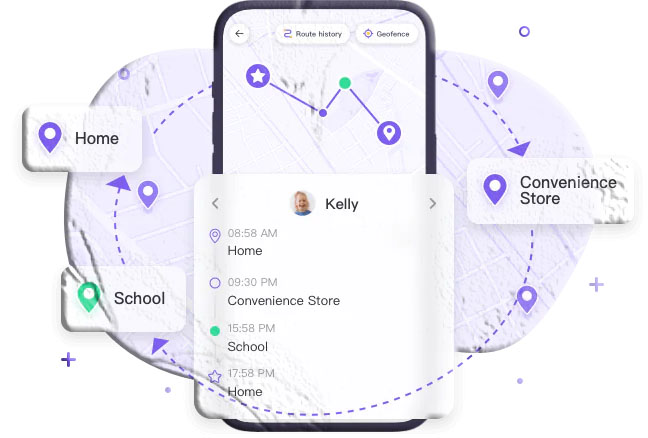
- Additional features — geofencing, location history, app monitoring — provide context beyond a single location point
This design produces reliable, accurate, ongoing location awareness. It doesn’t depend on the child choosing to click a link. It doesn’t fail when GPS signal is temporarily unavailable (it falls back to Wi-Fi and cellular data). And it provides a history of where the device has been, not just a snapshot of where it is at the moment you check.
MyParental Family Locator: A Genuine Solution for Parents
MyParental Family Locator is built specifically for the parent-child relationship, with a feature set designed around real family safety needs rather than the surveillance-adjacent framing of many tracking apps.
Core Location Features
Real-Time GPS Tracking: The parent’s dashboard shows the child’s current location updating continuously on a map. Position data uses GPS, Wi-Fi, and cellular network signals in combination (A-GPS), providing reliable location even when moving between outdoor and indoor environments. The update frequency is configurable — parents can choose between more frequent updates (higher accuracy, more battery use) and less frequent updates (acceptable accuracy, reduced battery impact).
30-Day Location History: Unlike the one-time snapshots provided by SMS-based tracker apps, MyParental stores a timeline of the child’s location over the past 30 days. This history is accessible in the parent dashboard and shows movement patterns — routes taken, places visited, time spent at locations. This is useful for understanding regular patterns as much as for reviewing a specific day’s activity.
Geofencing with Instant Alerts: Parents define virtual boundaries around specific locations — school, home, a friend’s house, a sports facility — and receive automatic push notifications when the child’s device enters or exits each boundary. This is one of the most practically valued features: instead of texting “did you make it?” every time a child goes somewhere, the alert handles it automatically.
Remote Surroundings Monitoring (Android): On Android devices, MyParental allows parents to access the child’s phone camera to view the surrounding environment in real time. This provides situational awareness beyond location — particularly useful for parents of younger children who might not reliably communicate that something is wrong.
Digital Safety Features Beyond Location
Location is only one dimension of a child’s digital safety. MyParental’s broader feature set addresses the wider picture:
Screen Time Management: Set daily usage schedules and time limits per session. Configure different limits for weekdays and weekends. Receive alerts when limits are exceeded.
App and Content Blocking: Block specific apps or categories (gaming, social media) during defined hours. Configure content filters that restrict access to inappropriate websites.
Screen Mirroring: View the child’s device screen in real time through the parent dashboard. See which apps are open and what content is being viewed without needing to handle the device.
Notification Mirroring: Receive a copy of notifications arriving on the child’s device — providing awareness of incoming communications from new or unknown contacts.
Keyword Detection: Set up alerts that trigger when specific words or phrases appear in the child’s app activity, allowing targeted monitoring of specific safety concerns.
Setup Process
Step 1: Download MyParental Parental Control on the parent’s device. Create a parent account.
Step 2: On the child’s device, install the MyParental Kids companion app. Do this openly, with the child present. Explain what the app monitors and why.
Step 3: In the parent app, a pairing code is generated. Enter this code on the child’s device to link the two accounts. The pairing is secure and account-specific.
Step 4: Configure the location and monitoring settings that match your family’s needs. Not every feature needs to be active — choose the level of oversight appropriate for your child’s age and your specific safety concerns.
Step 5: Set up geofences for the locations most relevant to your family’s routine.
Step 6: From your parent dashboard, you’ll see the child’s location updating in real time. Explore the additional monitoring features and configure them based on your family’s discussion.
The Transparency Principle
MyParental works most effectively when it’s installed and used as part of an open family conversation rather than covertly. Children who know monitoring tools are in place and understand the reasoning behind them tend to show better online behavior and report more positive trust relationships with parents than those who discover monitoring they were unaware of.
Research consistently supports that transparent monitoring — where the child understands what is visible and why — produces better outcomes than secret surveillance, even when the intent behind the secret monitoring is protective.
Pricing
MyParental offers a free trial and subscription tiers based on commitment length — monthly, quarterly, and annual plans, with the per-month cost decreasing at longer commitment levels. The specific current pricing is available at MyParental’s website.
Comparison Summary: Which Tool Is Right for Your Need?
| Tool | What It Actually Provides | Best For | Accuracy | Requires Consent? |
|---|---|---|---|---|
| Mobile Locator | Registration region + carrier | Country/region identification | Registration only | No |
| Scannero | Registration region (fast) | Quick country lookup | Registration only | Paid feature requires it |
| Truecaller | Caller name + spam ID | Identifying unknown callers | Good for identity | No (community data) |
| Spokeo | Public records profile | US-based identity lookup | Variable | No |
| Number Guru | Community spam flagging | Spam confirmation | Registration only | No |
| Mobile Phone Number Tracker | Consent-based GPS | Location requests | Good (with consent) | Yes |
| Phone Number Location Tracker | Consent-based GPS (iOS) | iPhone location requests | Variable | Yes |
| Mobile Number Tracker & Locator | Carrier/state (India only) | Indian number identification | Registration only | No |
| Mobile Number Locator | Caller ID + registration city | Call management | Registration only | No |
| Phone Tracker by Number | Claimed GPS (unreliable) | Not recommended | Poor | Yes |
| MyParental Family Locator | Real-time GPS + full monitoring | Family safety, parental tracking | High (GPS+WiFi) | Transparent consent |
Legal and Privacy Considerations
Every tool in this guide collects or processes personal data to some degree. Understanding the privacy implications is part of making an informed choice.
Tracking Without Consent Is Illegal
Regardless of which tool is used, attempting to track another adult’s location without their knowledge or consent is illegal in most jurisdictions worldwide. In the United States, this can violate the Electronic Communications Privacy Act, state wiretapping laws, and anti-stalking statutes. In the European Union, it violates GDPR. Similar laws apply in most countries.
The fact that an app offers a “track any number” feature doesn’t make using it for non-consensual tracking legal. The legal liability rests with the user, not the app developer.
Your Data When Using Reverse Lookup Services
When you use services like Truecaller, Spokeo, or Number Guru, you are typically providing your own data as well as looking up others’. Truecaller explicitly collects your contact list. Spokeo’s data includes your search history. Number Guru’s community model involves user-contributed reports.
Review each service’s privacy policy before using it, and consider what data you’re comfortable sharing in exchange for the lookup information.
For Parents: Know the Legal Baseline
Parents have broad legal authority to monitor minor children’s devices in most jurisdictions. However, the appropriate scope of monitoring changes as children age, and adult children (18+) have the same privacy rights as any other adult. Transparent monitoring — where the child knows what is visible — is both ethically sound and practically more effective than covert tracking.
For more on digital rights and privacy, the Electronic Frontier Foundation’s guide to surveillance and privacy is a thorough and accessible resource.
Frequently Asked Questions
Can I really track a phone’s GPS location using just its phone number?
Not without software on the target phone or the owner’s active cooperation. Apps that claim to do this either return only registration location data (where the number was originally assigned, not where the phone is now), require the phone owner to click a link and grant permission, or are simply inaccurate. True real-time GPS tracking requires an app installed on the device being tracked — which for legitimate use means transparent consent from the phone owner.
What is the difference between registered location and current location?
Registered location is where a phone number was originally issued when it was assigned to a carrier and plan — typically a country, sometimes a state or city. Current location is where the physical phone (and its owner) actually are at this moment. These can be completely different: a US number registered in New York could currently be in Tokyo. Most “free” number trackers show registered location only.
Which free phone number tracker is the most accurate?
For caller identity, Truecaller has the largest database and most consistently accurate results for identifying who owns a number, though it comes with the privacy trade-off of sharing your contact list. For registration location and carrier data, Mobile Locator provides broad global coverage. For true real-time GPS location, none of the free tools in this guide deliver reliable results — that capability requires a dedicated app installed on the target device with the owner’s knowledge.
Is Truecaller safe to use?
Truecaller is a legitimate, widely used application with over 300 million active users. The functional concern is its privacy model: it aggregates contact lists from all users to build its database. When you install Truecaller, you’re sharing everyone in your contacts with the service. People who value the privacy of their contacts — or who have contacts who would not want their names associated with their phone numbers in a searchable global database — should weigh this before installing. Truecaller’s privacy policy details what data is collected.
What is the best app for tracking a child’s phone location in real time?
For parents specifically, dedicated family safety apps — not phone number trackers — are the right tool. MyParental Family Locator provides continuous real-time GPS tracking, geofencing with automated alerts, 30-day location history, and a comprehensive set of digital safety features. The key difference from number tracker apps is that MyParental is installed on the child’s device through a transparent setup, providing reliable and ongoing location data rather than one-time consent-based snapshots.
Can someone track my location using my phone number?
With the tools in this guide, someone with your phone number can typically find out what region it was registered in and which carrier it belongs to — not your current location. To get your actual current location, they would need to either send you a link and have you click it (consent-based GPS request), or have tracking software installed on your device. If you receive a text message with a location-sharing link from an unfamiliar source, be cautious about clicking it — these links can be used to collect your location data if you grant permission.
Why do most “track any phone number” apps not work as advertised?
Because providing real-time GPS location for an arbitrary phone number isn’t technically possible without software on the target device. Apps that claim this capability typically deliver one of three things: registered location data (not current location), a consent-based SMS link system (which requires the target to cooperate), or simply inaccurate results. The marketing often implies passive tracking capability that doesn’t exist without installation and consent.
Is it legal to use phone number tracker apps?
Using a reverse lookup or caller ID tool to identify who owns a phone number is legal in most jurisdictions — these services work with publicly available data. Using a GPS-based tracker app that requires an SMS link is legal if the person you send it to is an adult who consents and chooses to click it, but is legally problematic if used as a deceptive tactic to extract someone’s location without genuine consent. Installing any tracking software on another person’s device without their knowledge is illegal in most countries. Always verify the legal requirements in your jurisdiction before using any location tracking tool.
Conclusion
The mobile number tracker category is one of the most misrepresented in the app and web tool landscape. The gap between what most tools advertise — “track any phone’s real-time GPS location for free” — and what they actually deliver — registered location data and varying degrees of identity lookup — is wide enough to mislead a significant number of users who install them expecting something they won’t get.
The honest summary is this: if you need to identify a caller or confirm who owns a phone number, Truecaller (for identity) and Mobile Locator (for carrier/region data) are the most reliable free options. If you need to request someone’s current location and they’re willing to share it, the SMS-based GPS apps provide a reasonable mechanism — but only with that person’s active participation.
And if you’re a parent who needs reliable, ongoing real-time location tracking of a child’s device — which is the most common and most legitimate use case for this kind of tool — dedicated family safety apps like MyParental Family Locator are the right category of tool entirely. They provide what number trackers promise but can’t deliver: accurate, continuous, GPS-based location data, combined with the broader digital safety features that make the difference between knowing where your child is and genuinely understanding their digital environment.
This article is for informational purposes only. Always verify that your use of any phone number tracking or location tool complies with applicable laws in your jurisdiction. Tracking another person’s location without their informed consent is illegal in most countries and is not something any tool in this guide is intended to facilitate.