
Introduction
Snapchat is built around spontaneity — quick snaps, disappearing messages, and real‑time interactions. But unlike other social platforms, Snapchat doesn’t show a traditional “online” indicator. There’s no green dot next to someone’s name (unless they enable a specific feature), no “active now” banner, and no typing bubble unless they’re literally typing at that moment.
So the big question is:
How do you know if someone is online on Snapchat?
Whether you’re trying to catch a friend for a quick chat, coordinate plans, or simply understand how Snapchat activity works, there are ways to tell if someone is active — you just need to know where to look.
After testing Snapchat’s features across multiple devices, we’ve identified 7 reliable methods to check if someone is online or recently active on Snapchat.
Let’s break them down.

Why Snapchat Doesn’t Show Online Status
Snapchat prioritizes privacy. Unlike apps such as WhatsApp or Messenger, Snapchat avoids showing:
- Online status
- Last seen
- Active now indicators
Instead, Snapchat uses indirect signals such as:
- Snap Map updates
- Story views
- Snap Score changes
- Chat activity indicators
- Bitmoji movement
These clues help you understand someone’s activity without revealing too much.
7 Ways to Know If Someone Is Online on Snapchat
Below are the most effective, legitimate, and privacy‑respecting methods to check someone’s Snapchat activity.
Way 1: Check the Green Dot (Activity Indicator)
Snapchat introduced the Activity Indicator in 2023 — a small green dot that appears on a user’s profile when they’ve been active recently.
Before You Start
Both you and your friend must have Activity Indicator turned ON.
How to Check:
- Open Snapchat.
- Go to your friend’s profile.
- Look for a green dot next to their Bitmoji or name.
What It Means:
- Green dot visible: They are online or were active within the last 24 hours.
- No green dot: They haven’t been active recently, or they disabled the feature.
Note:
This feature is optional. Many users turn it off for privacy.
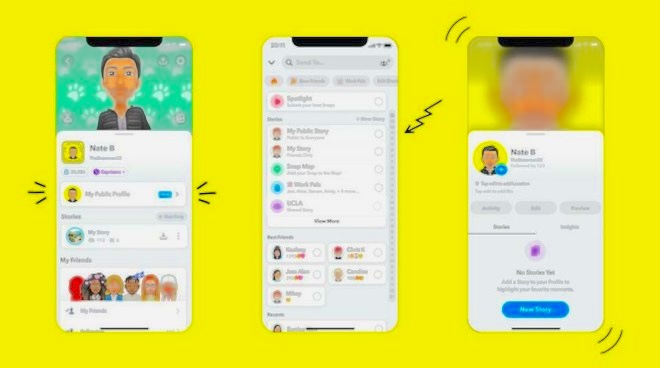
Way 2: Look at Snap Map Activity
Snap Map is one of the most accurate ways to check if someone is online — but only if they’ve enabled location sharing.
Snap Map updates a user’s location only when they open the Snapchat app.
Before You Start
Your friend must:
- Share their location with you
- Not be in Ghost Mode
- Have “Last Active Location” enabled
How to Check:
- Open Snapchat.
- Tap the Snap Map icon (bottom left).
- Tap your friend’s Bitmoji.
What You’ll See:
- “Here just now” → They are online right now.
- “Here 5m ago” → They were online recently.
- “Here 1h ago” → They haven’t opened Snapchat for a while.
External Link:
Snap Map Help Center: https://support.snapchat.com/en-US/article/snap-map
Way 3: Review Your Sent Snaps (Opened vs. Delivered)
Snapchat’s message status system is one of the clearest indicators of activity.
How to Check:
- Open your Chat screen.
- Look for your recent snaps or messages.
- Check the status:
Status Indicators:
- Delivered → They haven’t opened Snapchat yet.
- Opened → They opened your snap or message.
- Opened just now → They are likely online.
Bonus Tip:
If you open the chat and see their Bitmoji appear in the bottom left, it means they are currently viewing the chat.
This is one of the most accurate real‑time indicators.
Way 4: Check Their Snap Score
Snap Score increases when someone:
- Sends snaps
- Opens snaps
- Posts stories
- Interacts with the app
How to Check:
- Open Snapchat.
- Go to your friend’s profile.
- Note their Snap Score.
- Check again after 5–10 minutes.
If the score increases:
They were active during that time.
If it stays the same:
They may be offline or not interacting with snaps.
Way 5: Examine Your Story Views
Snapchat shows exactly who viewed your story — and when.
Before You Start
Your friend must have viewed your story.
How to Check:
- Post a story.
- Tap your profile icon.
- Go to My Stories.
- Tap the eye icon (Android) or expand the story menu (iOS).
- Check the view timestamps.
What It Means:
- If someone viewed your story seconds or minutes ago, they were online at that moment.
- If they viewed it hours ago, they were active earlier.
Way 6: Enable Story Notifications
If you want to know the moment someone posts a story, you can enable story notifications.
How to Enable:
- Open Snapchat.
- Tap your profile picture.
- Tap Settings (top right).
- Select Notifications.
- Turn on Stories from Friends.
- Tap Manage Story Notifications.
- Select the friends you want to follow.
What Happens Next:
You’ll receive an instant notification when they post a story — meaning they were active at that moment.
Way 7: Use a Snapchat Activity Monitor (For Parents Only)
If you’re a parent trying to understand your child’s Snapchat usage, tools like MyParental can help you monitor:
- App usage duration
- Last time Snapchat was opened
- Screen time
- Digital wellbeing patterns
MyParental does not read private messages or bypass Snapchat’s privacy. Instead, it focuses on:
- App activity
- Notification syncing
- Keyword alerts
- Healthy digital habits
How It Works:
- Install MyParental on your device.
- Install MyParental Kids on your child’s Samsung or Android phone.
- Pair the devices.
- Open Today’s Events.
- Look for Snapchat usage timestamps.
This helps parents understand when their child is active on Snapchat — without invading their privacy.
Bonus Tips: How to Tell If Someone Is Ignoring You on Snapchat
Sometimes the issue isn’t whether they’re online — it’s whether they’re responding.
Here are signs someone may be ignoring your snaps:
- Your snaps stay Delivered for hours
- They view your story but don’t reply
- Their Snap Score increases but they don’t open your messages
- They are active on Snap Map but not responding
These signs aren’t definitive — but they can offer context.
Privacy Note: What You Can’t See on Snapchat
Snapchat does not show:
- Exact online status
- Last seen
- Whether someone is typing unless they’re actively typing
- Whether someone is viewing your profile
- Whether someone is checking your Bitmoji
Snapchat intentionally limits visibility to protect user privacy.
Conclusion
Snapchat doesn’t offer a traditional “online” indicator, but with the right tools and clues, you can still figure out whether someone is active. From Snap Map updates to Snap Score changes, story views, and chat indicators, these methods give you a clear picture of someone’s recent activity.
And if you’re a parent, tools like MyParental help you understand your child’s Snapchat usage responsibly — without invading their privacy.
Whether you’re trying to catch a friend for a quick chat or simply understand how Snapchat activity works, the methods in this guide will help you stay informed.
FAQs About Knowing If Someone Is Online on Snapchat
1. Can you see when someone was last active on Snapchat?
Yes — Snap Map shows “Here just now” or “Here X minutes ago” if location sharing is enabled.
2. Does Snapchat show online status?
Only if the Activity Indicator (green dot) is turned on.
3. Can you tell if someone is ignoring you?
If your snaps stay “Delivered” while their Snap Score increases, they may be active but not responding.
4. Can parents monitor Snapchat activity?
Yes — tools like MyParental can show app usage times and notifications.
5. Does Snap Score update instantly?
Usually yes, but sometimes it updates with a slight delay.
6. Can you hide your Snap Map activity?
Yes — enable Ghost Mode in Snap Map settings.
7. Can you check if someone viewed your profile?
No — Snapchat does not provide profile view notifications.